Announcing: Clara Insights
Aakar Mutha & Ben Wallace
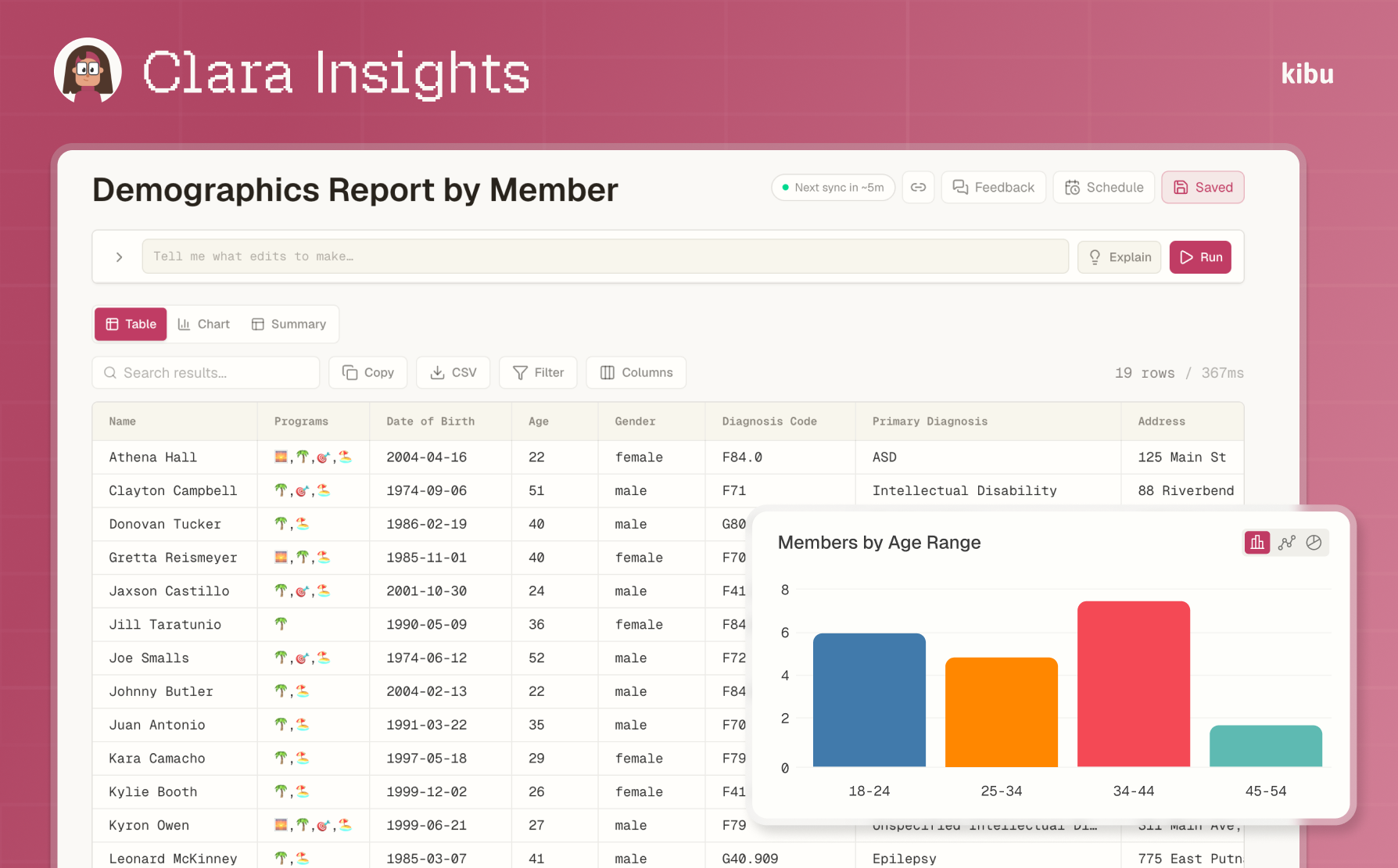
Today, Kibu is proud to launch Insights: an analytics studio that lets you build, save, chart, and schedule the exact table you need, with Clara right there to help. It is available to all Kibu Documentation customers at no additional charge.
Let's set the scene: you run a Day Hab provider, helping people with IDD build skills, friendships, confidence, and a real sense of belonging.
But then the data requests start coming in:
- An auditor asks for a demographics breakdown, a time tracking report, and a 3-month note history for three individuals.
- A parent asks for every documented behavior their child has had this quarter.
- Your billing team wants a list of service records missing signed notes before claims go out.
- Your program team wants to know how many cooking-related goals are in progress, so they can forecast scheduling and budget.
What started as a day of supporting people has now turned into a scramble to prove your work.
Every provider Kibu works with has questions hiding inside their data. The data exists: the problem is that getting to it usually means downloading a cookie-cutter PDF, exporting a spreadsheet, deleting half the columns, writing a few formulas, asking someone else for help, and then hoping nobody asks a follow-up.
The era of click-drag-and-wait report builders is over. The era of "mostly what I want, I'll finish it in Excel" is over.
With Insights, you just ask Clara.
Clara, now with a new skill
Last year, we introduced Clara, Kibu's AI assistant for documentation. Clara already helps customers turn daily notes and service records into member-level narratives and monthly reports in minutes, not hours, with one-click exports to Word and PDF.
For months, Clara has been your writer 🤓✏️
Now, Clara is also your data analyst 🤓🔢
Ask her a question like:
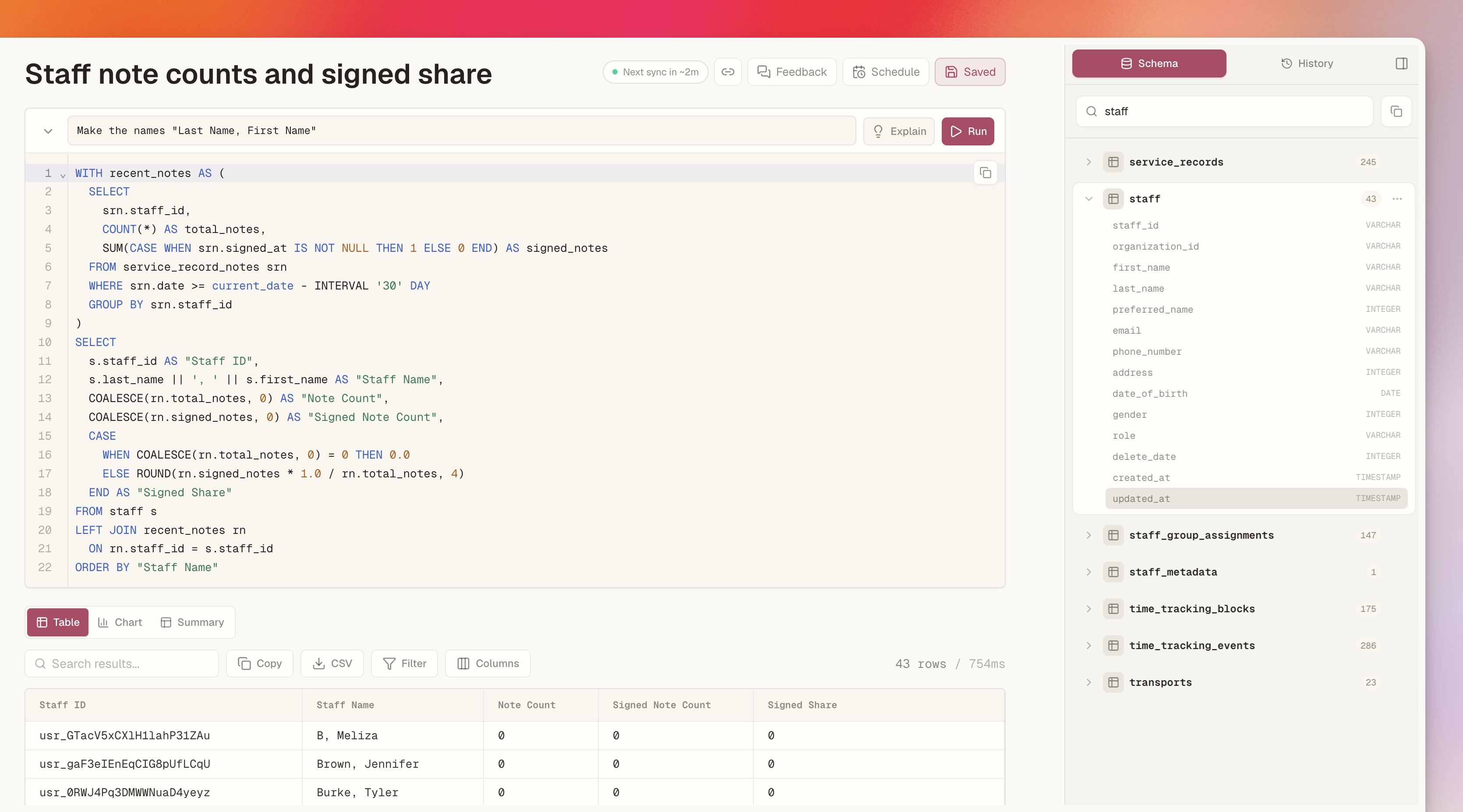
"Show me every staff member's note count for the last 30 days and what share are signed."
Clara builds the Insight, runs it against your Kibu data, and gives you the table. If it is not quite right, you just keep talking:
- "Only show the last quarter."
- "Add a column for billable hours."
- "Make the names last name, first name."
If you can imagine a table with data that exists in Kibu, Clara can build it for you.
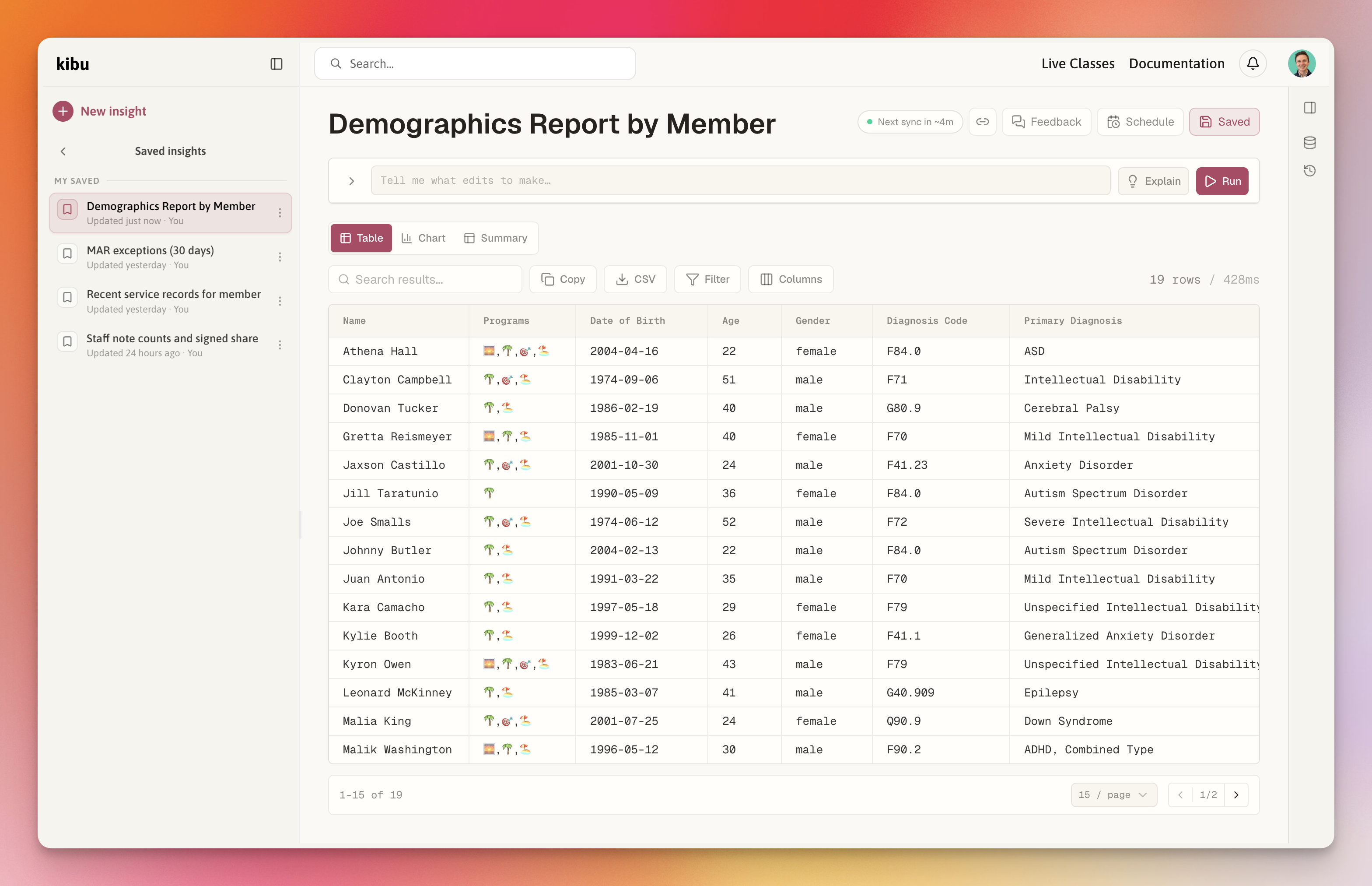
What you can ask
Insights was built for the real reporting questions providers run into every week, while accommodating the nuances of each provider's data and workflows.
You can ask for compliance and audit reports:
- Show service records from the last 60 days that do not have a signed note.
- Give me a 3-month note history for Athena, Donovan, and Clayton.
- Show member demographics by age band and gender.
You can ask for day-to-day operational checks:
- Show billable hours by month over the last year.
- List MAR exceptions from the last 30 days.
- Show me members who haven't logged a Bowel Movement in the last 7 days.
You can ask for Kibu onboarding and maintenance help:
- Give me a count of staff and members in each group.
- List all active goals for all members in a comma-separated list.
- Show members with no active goals.
- Give me a breakdown of the settings for each group, particularly the note template being used.
And you can use Insights for the weird, just-in-time rabbit holes that come up in real provider life:
- Show me all incidents and seizures for Athena, so I can send them to her mom.
- Find all notes where my staff mentioned "community" or "outside" in a text field.
- Find goals that mention cooking, then count the "Yes" participation responses for those members in the last month.
If the data lives in Kibu, Insights can probably help you shape it into the table you need.
A table first, then whatever you need next
Every Insight is just a data table underneath. From there, you can turn the same result into the format that fits the job:
- Use the table when you need the source details.
- Use a chart when you need to see a trend or share a quick visual.
- Use a summary when you want totals, averages, or grouped numbers.
- Export to CSV when someone still needs a spreadsheet.
- Save the Insight when you know you will need it again.
- Schedule the Insight when it belongs in someone's inbox every day, week, or month.
And if you are not sure how to read what you are looking at, press Explain. Clara will summarize the Insight in plain English so more people can understand the data presented and why it matters.
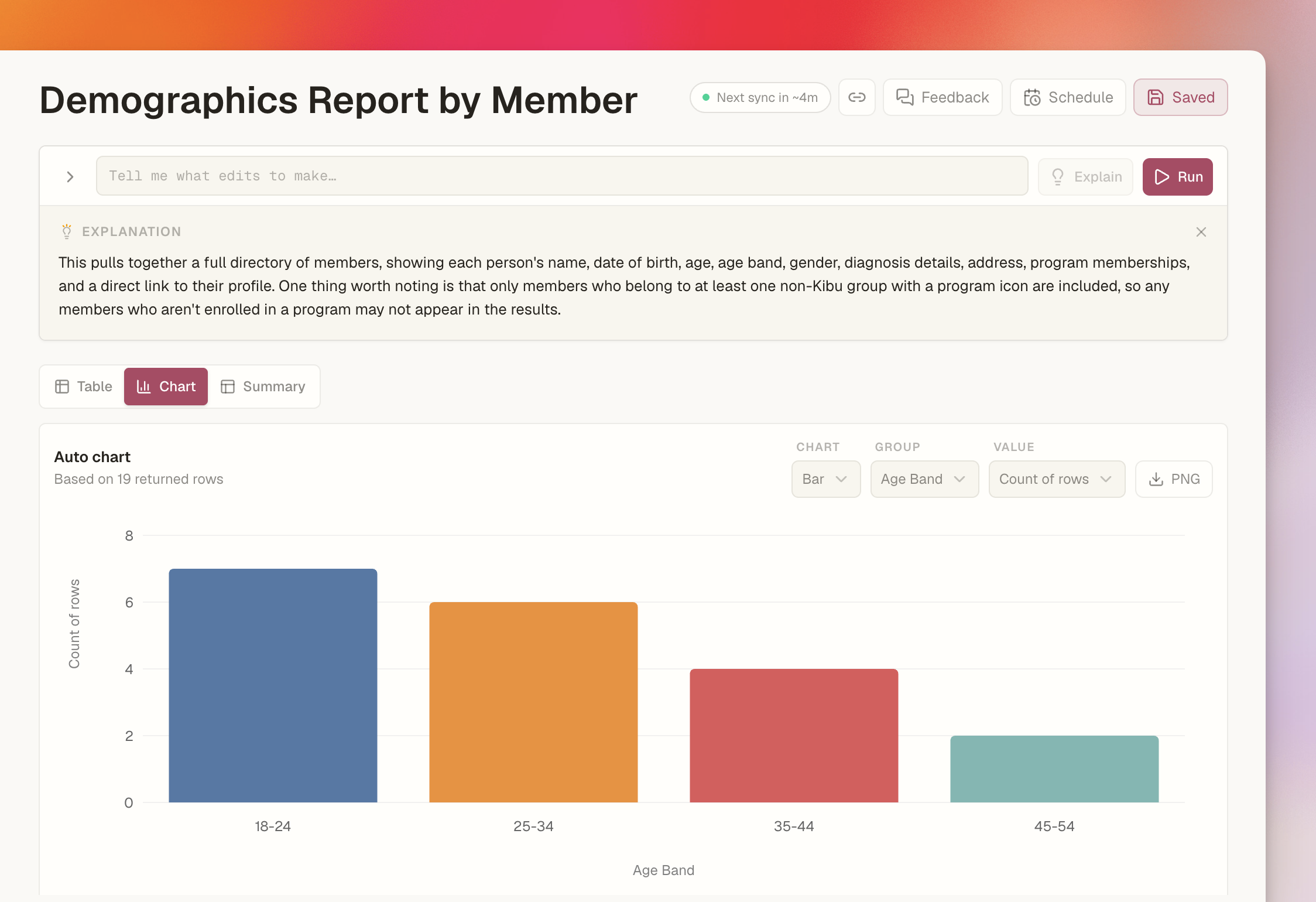
In the future, we hope to expand the UI by offering more customizable charts, pivot tables, and even PDF exports that fit the needs of each use case.
Start from scratch, or start from a template
Plain English is the most flexible way to use Insights, but we also built a gallery of ready-made reports for common provider workflows. That includes starting points for medication and MAR, service and billing, appointments, documentation compliance, members, demographics, and more.
So if you know exactly what you want, ask Clara. If you just need a useful place to start, open the gallery.
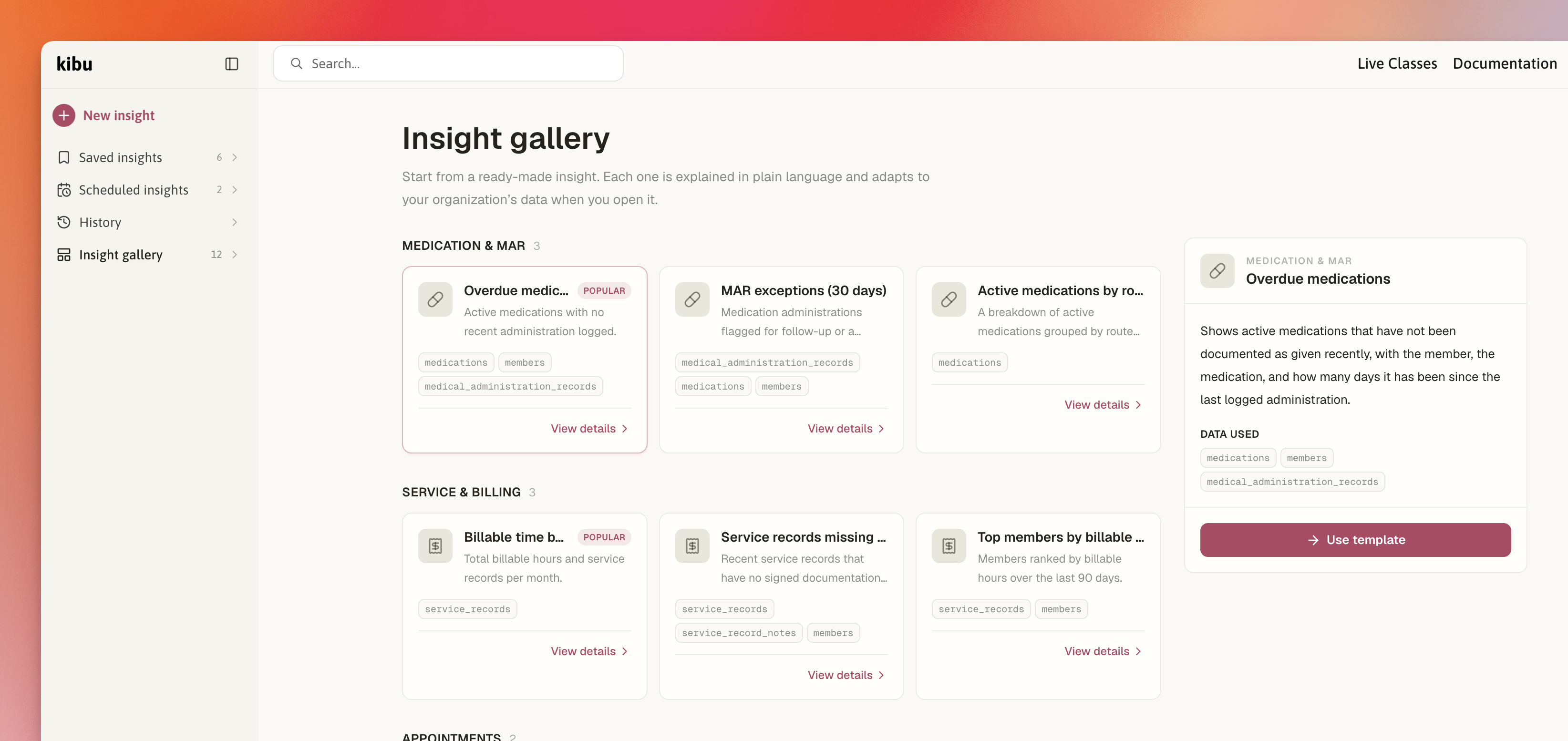
We are especially excited about this because we hope the template gallery becomes more of a community where rockstar organizations (and maybe even states 😜) can contribute reports and share them with the greater Kibu customer base.
Is it safe? Yes.
We build for disability providers, so this was never optional.
Insights is read-only. There is nothing Clara, or you, can do inside Insights to create, update, or delete a Kibu record.
Insights is also permission-gated because it can answer broad questions across an organization. Super Admins have access by default, and organizations can manage access through custom roles.
Every piece of technology we use for Insights, including the AI models, is covered by a BAA. Kibu is HIPAA and SOC 2 compliant.
We have sat across the table from providers who were told that AI was too risky for this space. We disagree. We think AI is too useful for this space to be left to tools that were not built for providers, compliance, or the people being supported. So we built it carefully.
For the nerds: how it actually works
To all the IT admins, analysts, and devs... how do we actually make this work?
Every Insight is one data table with one query underneath it. We call that query language KQL, short for Kibu Query Language.
We took inspiration from tools like Stripe Sigma, ShopifyQL, Salesforce SOQL, and PostHog's HogQL. The shared idea is simple: give people direct access to their own data, then let them shape it however they need.
Technically, an Insight can be handwritten with KQL. KQL is DuckDB SQL running against a read-only copy of your Kibu data, and we include the full schema inside Insights so technical users can inspect the tables, columns, and relationships available to query.
But our bet is that most people will never write KQL: AI has become powerful enough that most Insights will be created through natural language. Clara writes it for you. This semantic layer lets the true documentation experts query their data without needing to know SQL. At the same time, KQL is the serious layer underneath that is deterministic, mathematical, and verifiable by the people who want to inspect it.
Here is a simple example.
A user asks Clara:
"For each staff member, show me how many notes they wrote in the last 30 days, and what share are signed."
Clara writes the KQL:
SELECT
  s.first_name || ' ' || s.last_name AS "Staff Member",
  count(*) AS "Notes",
  count(srn.signed_at) AS "Signed Notes",
  round(100.0 * count(srn.signed_at) / count(*), 1) AS "Signed %"
FROM service_record_notes srn
JOIN staff s ON s.staff_id = srn.staff_id
WHERE srn.date >= current_date - INTERVAL '30' DAY
GROUP BY "Staff Member"
ORDER BY "Notes" DESC
You get one row per staff member, sorted by note volume, with a signed percentage you can act on before an auditor ever asks.
A few more details we care about:
- KQL is strictly read-only. Insights cannot create, update, or delete Kibu records.
- Insights syncs from Kibu every few minutes, so reports are near real-time without being mixed into the live documentation workflow.
- The same saved Insight runs consistently each time because the KQL is saved underneath it.
- If you know SQL, you can open the editor, inspect what Clara wrote, and take the wheel.
Try it
Insights is available to all Kibu Documentation customers. You will see it in the Clara section of the Kibu sidebar, or you can visit app.kibu.com/insights.
We are proud of this one! It is a meaningful addition to the Kibu product stack, as it opens up a new kind of reporting that lets 👏 providers 👏 cook 👏👨🍳💻.
If you build an Insight you are proud of, send it our way! We'd love to add it to the Template Gallery 😁.
Frequently Asked Questions
What is Insights?
Insights is an AI reporting tool for disability providers using Kibu Documentation. You ask Clara questions about your Kibu data in plain English, and Clara builds a report you can view as a table, chart, or summary.
How does Insights help with audits and compliance?
Insights helps providers quickly answer audit and compliance questions, such as missing signed notes, member demographics, service record history, MAR exceptions, and documentation trends.
Do I need to know SQL to use Insights?
No. Most users can create Insights by asking Clara questions in plain English. Technical users can also inspect, edit, or write KQL directly.
What is KQL?
KQL is the query layer behind Insights. It uses DuckDB SQL against a read-only copy of your Kibu data, giving technical users a structured and verifiable way to inspect reports.
Is Insights HIPAA compliant?
Yes. Insights is read-only, permission-gated, and built on BAA-covered infrastructure. Kibu is HIPAA and SOC 2 compliant.